
We've updated our functionality for creating collections in the AccelPay Portal!
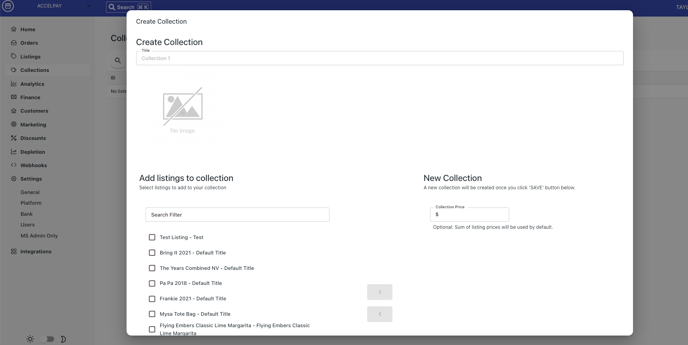
To create a collection, login to the AccelPay Portal and go to Collections. Here you can click the button in the right hand corner, "Add Collection." You then add a title, and select which items you want to include in the collection and the quantity of each item. You can also set a price for this collection if you want the price to be different than the sum of all the products combined.
When you go to your Collections tab, you will either see Collections (V2) or Collections. We have two versions. If you are Collections V2 and want to see if you are eligible for Collections V3, email your Account Manager and they will confirm whether it's an option for you.
Collections 2.0
For this version, after you create the collection in the Portal, if you are using Shopify, it will immediately create 2 products in Shopify. These products are automatically set to have $0 and 0lb weight, they are not visible or part of any catalogue, but they allow 2 tracking numbers to be pushed into Shopify later on. They don’t influence inventory or anything else. We refer to these products as "Ghost products."
Collections 3.0
This most recent version of our collections will automatically break out each item within the collection to the retailers when an order comes through for it. This is so that retailers understand what items specifically need to go out for this order. The same is true for collections that include both merchandise and alcohol. The merch portion of the order will still get routed to the "merch retailer" and the alcohol portion will get routed to the AccelPay retailer that has available inventory for the item and can ship to that state within it's reach.
If you are using Shopify, you can create your collection/bundle as one item and we can link this collection within our Portal to this bundle so that the items are sent correctly to the retailers. Be sure to work with your Account Manager on this directly so ensure proper set up.