![AccelPay Logo.svg]](https://try.accelpay.io/hubfs/AccelPay%20Logo.svg)
This is only applicable if you are using the AccelPay-Shopify-Integration. If you are using the native AccelPay cart, all orders are automatically visible in the AccelPay Portal.
The AccelPay Fulfillment App in your Shopify store ingests every order from Shopify to the AccelPay Portal. For this import to work, all products available in Shopify must be mapped in the AccelPay Portal.
[Learn more on the process of adding and mapping products correctly here.]
If the products are not mapped correctly, the AccelPay app cannot ingest the order into the AccelPay Portal, and subsequently the order is not routed to any retail partner to fulfill, leading to extended fulfillment times until you manually corrected the link.
If you see this error on the order level...
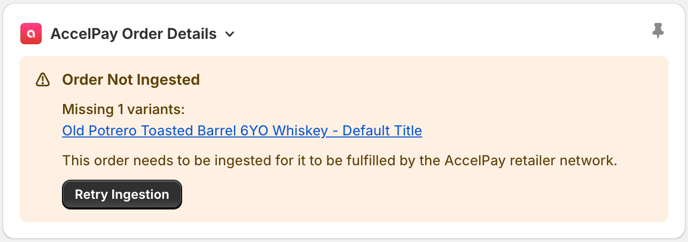
... here is what do to:
- Log in to your Shopify Store and navigate to any product.
- Scroll all the way down until you see the App Blocks. Add the "product-admin-block"
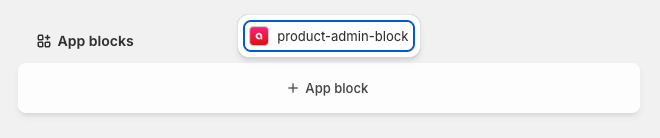
- Pin the block to the order page for all staff by clicking the pin icon
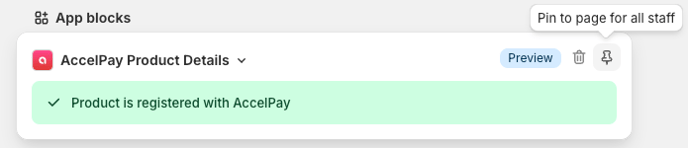
- Once set up, every product will have a App block, indicating whether or not the product is mapped to AccelPay.
- If it is not yet mapped, you can register it directly in the widget.
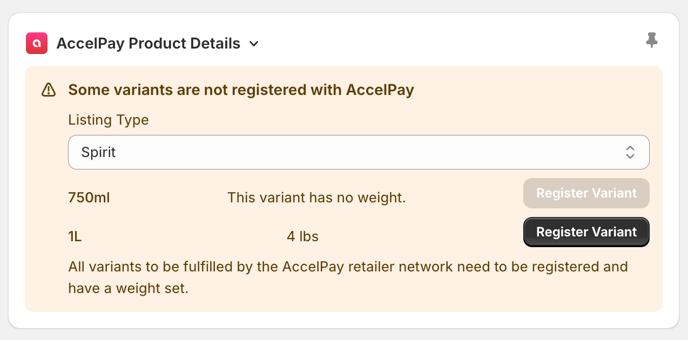
Remember that every product needs to be connected to a retailer by an AccelPay team member before it can start selling online. Learn more on the process of adding new products correctly here.
Please note that App blocks can only be used with Online Stores using Shopify 2.0 themes.